switch AI without restarting your project.
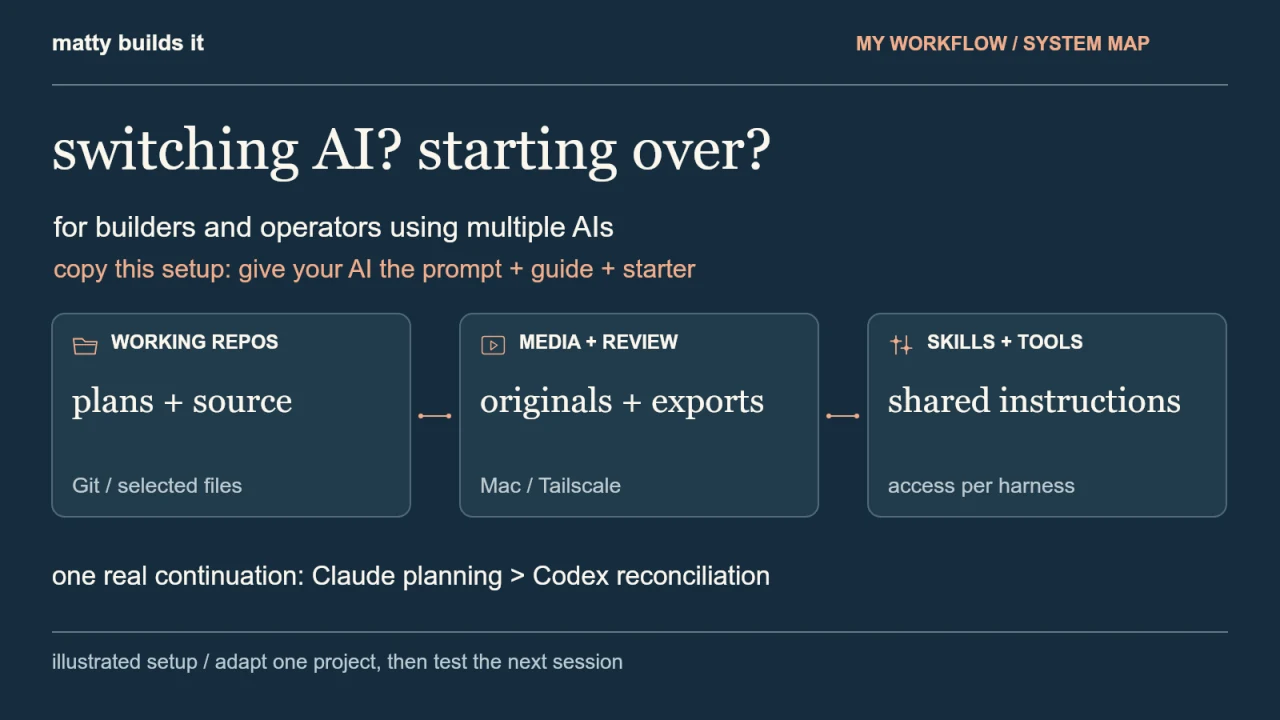
for builders and operators using more than one AI. the file structure, media storage, sync routine and shared instructions behind my Claude-to-Codex workflow.
give your AI the starting kit.
download the kit, attach the guide and starter, then paste the prompt with your project details. review the plan it proposes. start with one real project and test a small task in your next AI session.
read or copy the setup prompt
a reusable starting template. your assistant adapts it to the project and access you already have.
Help me keep one real project usable across AI assistants, using the attached Matty Builds It guide and starter as a reference.

Project: [name and one-sentence purpose]
Assistants I use: [for example, Claude Code and Codex]
Existing working folder or files: [path, or attach the relevant files]
Large-media location, if any: [path/service, or none]
Review device: [computer/phone]

If I leave something blank, inspect the supplied materials first and ask only for information you cannot establish. The guide describes one person's setup; adapt it to my project rather than copying every repo or tool.

FIRST, INSPECT AND PROPOSE

1. Read the supplied guide.md, starter README, existing AGENTS.md/CLAUDE.md, current state and relevant working files. Treat example values as examples, not facts. Check which file, shell and service tools you actually have. If you can only chat, give me a proposed structure and steps instead of claiming you changed anything.
2. Describe the problem this setup solves for my project and who uses it. Inventory the existing files and any uncommitted work. Preserve existing source, rules and plans. Identify one authoritative home for each kind of record so we do not create competing calendars or drafts.
3. Propose the smallest useful structure. One repo with plans/, projects/, evidence/, media/ and selected shared instructions may be enough. Keep large originals/exports in a separate media home, referenced by stable IDs, relative paths and real file hashes. Keep machine-specific paths in ignored .local/paths.json. Never fill in a pretend hash or claim a file is backed up just because it has an index entry.
4. Explain how source will sync, how media is reached or copied separately, and where review versions will live. Check current branch/changes before any Git operation. Git does not transfer browser sessions, credentials or large media. Identify the access each machine or assistant still needs. Show me the plan before changing files unless I have already approved that exact scope.

THEN, IMPLEMENT THE APPROVED SCOPE

5. Add or adapt the agreed files without replacing my working content or weakening existing instructions. Merge shared operating rules with a clear entry point for each assistant. Record actual state, decisions, source locations and the next action. Rename or omit example files so they cannot be mistaken for real records.
6. Add only skills relevant to this project. Verify their source, license, pinned version and supported discovery path for each assistant. Record actual installed skills separately from proposed ones. Shared instructions do not grant tool access. Jev is optional and is not required to use this structure. Do not make paid calls, create service accounts, publish, alter hosting/access or install external tools without my applicable authorization.
7. If phone review is in scope, explain the hosting choice and its online/access requirements. Serve only a selected export directory, not my repo or media library. Verify the chosen device can load the page, play the video and download the expected files before claiming it works there. Keep reviewed versions identifiable.
8. Inspect tracked/staged files for credentials, private data and media before committing. Preserve concurrent changes, reconcile conflicts and never force-push. Follow the approved sync workflow; do not create a public repo or remote as a shortcut.

VERIFY AND HAND OVER

9. Check that the working plan points to real source, any indexed media exists and matches its hash, and local bindings/secrets are excluded from Git. Make sure existing work survived and no second authoritative plan was created. Report checks run and missing access honestly.
10. Write a short start-here instruction for a fresh session: the exact files to read, one small next task and how to verify it. Have the next assistant complete that task from the saved files. If you cannot run that separate session yourself, give me the test and mark cross-assistant continuation unverified. Do not claim universal memory or automatic synchronization.

Start with inspection and the proposed plan.
the kit supplies instructions and a starter workspace. connect your own tools and storage. it contains no account access, raw footage or installed TypeSafe skill.
the problem and the result
using Claude for part of a project and Codex for the next part? if each switch means explaining the plan again, finding the latest files and figuring out what already happened, the setup around the AI needs some attention.
this is for builders and business operators who use more than one assistant on ongoing work. the aim is simple: give the project a clear home so the next assistant can reach the files, understand their status and take the next step.
i worked in Claude, returned to Codex, and continued the same content project. Claude's planning work was saved. Codex read it, checked the published results and updated the shared records. here is the structure behind that, plus a way to adapt it to your work.
Start with the prompt, guide and starter
download the replication kit and unzip it. it contains this guide, setup-prompt.txt and a small starter workspace. open your existing project in an assistant with file access, or attach the relevant files in chat. give it the guide and starter, then paste the setup prompt with your project details.
the prompt asks your AI to inspect what you already have and propose a structure before making changes. review that plan, then let it set up the parts you approve. a chat without file access can explain the steps, but cannot create folders or connect your accounts for you.
you do not need to recreate all my repos or use Jev to start. the guide explains the choices so your AI can adapt them.
1. Give each kind of work an owner
i keep operations, content production and website source in separate repos. the ops repo owns the calendar, decisions and current priorities. the studio owns editable content projects. the website repo owns the sites.
this matters when an assistant needs to change something. the calendar in Ops is the working calendar. a posting plan bundled with a video is a snapshot. if both become independent plans, they will eventually disagree.
start smaller if you have one project. the starter included here uses one repo with a place for plans, projects, evidence and skills. separate repos become useful when the work has different owners or dependencies.
workspace/                 plans, decisions and working source
  AGENTS.md                shared working rules
  CLAUDE.md                points Claude to those rules
  STATE.md                 current state and next action
  plans/                   the active plan
  projects/                editable work
  evidence/                checks and result references
  media/                   asset index, not raw footage
  .agents/skills/           selected shared instructions
give your AI the setup prompt with this guide, and ask which of these homes your project needs. these names are conventions for the workspace. reading a Markdown file only helps when the assistant actually has file access and follows the instructions.
2. Keep a map to the big files
my original footage and rendered videos live outside Git, in a media home on the Mac. each story has originals, review material, project files, exports and references to delivered versions.
the repo stores the asset ID, relative path and hash. an edit can refer to the same source file from several projects without making several competing originals. the hash lets a copy be checked when it moves.
media-home/
  stories/
    example-story/
      originals/
      review/
      project-files/
      exports/
on another machine, the actual media still needs to be copied or made available through storage you control. update that machine's local path mapping and check the files. the manifest is a map; it is not a backup.
3. Sync before changing tools
my working rhythm is fetch, inspect, read, work, check, commit and push. when another assistant opens the repo, it reads the current files and compares them with the actual work.
if there are local edits, preserve them. if someone else changed the same file, reconcile it before pushing. i do not want one assistant wiping out another assistant's work just to make its own checkout clean.
Git carries the source and records we chose to track. it does not give the next assistant my browser sessions, credentials or raw footage. a different computer needs its own authorized access.
the setup prompt asks your AI to write a sync routine for your actual tools and access. use that part of the guide when the project moves between machines.
the handoff file helps point to the next action. the structure and saved work are what let that action happen.
4. Host somewhere to review the result
my content exports go into a review gallery served by the Mac. Tailscale gives my phone access to that private gallery. i can watch a cut, swipe through a carousel and read the captions in one place.
the review version stays identifiable. if i ask for changes, the next version gets its own place. the assistant should be able to tell which export i reviewed and which one was approved.
this is local hosting over a private network. the Mac needs to be online. it is not a separate cloud backup, and viewing a package does not publish it.
for a first setup, make one export accessible and test it from the device you actually use to review. check that the video plays and the download is the file you expect.
5. Share a skill, then connect the runtime
one concrete example in this repo is the TypeSafe skill. its pinned source lives under .agents/skills/typesafe-ai. Claude's skill folder links to that same directory. that avoids maintaining two copies of the instructions.
a skill describes how to do a job. the harness is the app running the assistant and exposing its tools. sharing the instructions does not automatically give both harnesses the same browser, file access or service login.
the portable part includes the skill source, version, license and setup notes. machine-specific credentials stay out of the repo. check the tools that are actually available in the new session before assuming it can execute the procedure.
when your AI reaches this step in the setup prompt, ask it which skills the work needs and what each assistant can run. the starter includes the folder and an empty skill inventory. it does not install TypeSafe or include a key. pick the skills your own job needs and verify their source before adding them.
6. Give a small tool a clear job
i have tested Jev on two bounded decisions: sorting synthetic questions and choosing a link from a public page. in the navigation test, Jev picked Pricing. Codex handled the click and checked the resulting page.
that separation is useful: provide the allowed choices, get a decision, execute it through the right tool, then check the result. ordinary code can do the counting and validation.
these were supervised tests. i am not claiming an autonomous browser loop or that Jev now runs every part of the business. both assistants can read the shared skill here; a new machine still needs a key and an approved way to make calls.
What actually happened when I came back
Claude's planning work was saved in the repo. Codex read it, checked the scheduled Instagram releases through the publishing provider, and updated the records with the result. the continuation was committed and synced too.
that is the outcome i care about: the plan, source references and results remain available when i change tools. i can review the next piece and keep going.
Build your version
give your AI setup-prompt.txt, this guide and the starter folder from the replication kit. fill in the project name, assistants, existing files, media location and review device. review its proposed structure, then authorize the changes that fit.
the finish line is a small test: open a fresh session, point it to the saved rules and state, and have it complete one clear task from the actual files. check the result. if it cannot find the media or lacks a tool, fix that part of the setup and try again.
that is the practical payoff: work you can find, review and continue when you change tools.
one project. one useful test.
give your next assistant the saved rules and state. have it complete one clear task, then check what changed.
get the starting kit